
TL;DR:
- Effective signage workflow management involves creating standardized processes, roles, and technology to produce consistent, compliant signs that generate leads. Implementing proper design principles, role-based approvals, and automation tools ensures heightened readability, brand consistency, and faster updates, reducing errors and reprints. Meeting ADA and MUTCD standards within templates and conducting real-world testing are essential steps to prevent costly mistakes and legal issues.
Signage design for agents workflow is the structured process of creating, approving, and managing real estate signage to improve client interaction and marketing efficiency. Most agents treat yard signs as one-off print jobs. The ones generating consistent leads treat signage as a repeatable system with defined roles, legibility standards, QR code integration, and approval checkpoints. This guide covers the full process, from typography specs to role-based publishing, so your signs work harder at every listing.
What is signage design for agents workflow?
The industry term for this practice is signage workflow management, and it covers every step from initial design brief to physical or digital sign deployment. For real estate agents, this means more than picking a font. It means building a repeatable process that produces consistent, compliant, and effective signs across every listing.
Effective signage design integrates three layers: visual standards, team roles, and technology. Visual standards define legibility rules and brand elements. Team roles separate who creates content from who approves it. Technology automates scheduling, tracks changes, and captures leads. When all three layers work together, your signage becomes a marketing asset rather than a cost center.
The payoff is real. Nearly 60% of digital signage networks fail to produce positive ROI, mostly due to process failures rather than hardware problems. That statistic applies directly to real estate agents who deploy signs without a defined workflow. A structured process fixes the root cause.
Design principles that maximize readability
Real estate signage lives in the real world, where viewers are driving at 30 mph or walking past a property in changing light. Legibility is not a preference. It is a measurable standard.

The foundational rule: use 1 inch of capital letter height per 10 feet of viewing distance. A sign read from 40 feet needs 4-inch letters minimum. In poor light or high-speed conditions, increase that size by 30–50% for comfortable reading. This single rule eliminates the most common mistake agents make, which is printing contact numbers too small to read from a car.
Pro Tip: Test your sign proof by standing at the actual viewing distance before approving the final print. What looks readable on a computer screen often fails at 30 feet.
Beyond letter size, these principles define effective real estate sign design:
- Font choice: Use bold, high-contrast sans-serif typography exclusively. Thin fonts and script faces fail at distance. Helvetica, Arial, and similar typefaces perform best.
- Color contrast: Dark text on a light background, or light text on a dark background, is the standard. Avoid mid-tone combinations that blur in sunlight.
- Brand consistency: Place your logo, brand colors, and agent photo in the same position on every sign. Buyers recognize patterns faster than individual elements.
- Call to action: Every sign needs one clear next step. A phone number, a QR code, or a URL. Not all three competing for attention.
- QR codes: QR codes direct buyers to listings, virtual tours, or contact pages, converting drive-by attention into measurable leads. Place them large enough to scan from 3–5 feet away.
Consistent application of these rules across all your listings builds brand recognition faster than any single design choice.
How do role-based approvals improve signage consistency?
The most effective signage workflows separate content creation from governance. In practice, this means the agent or marketing coordinator creates the sign content, while a designated reviewer approves it before production or publishing. This two-step structure prevents errors from reaching print.
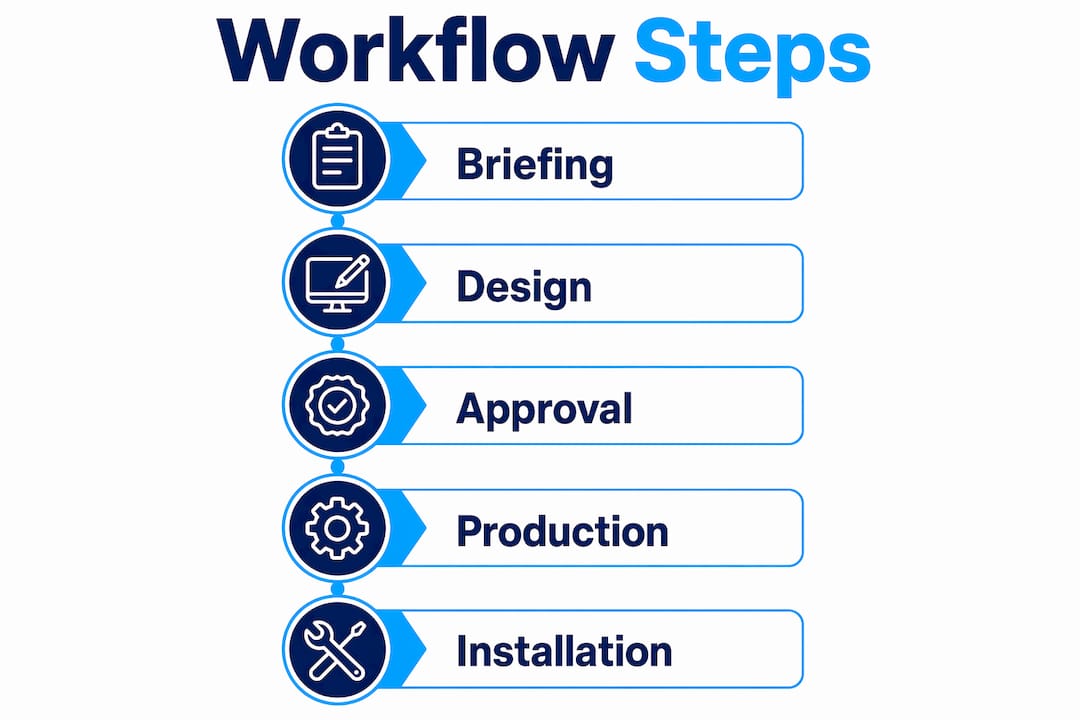
Here is a practical numbered workflow for agent teams:
- Brief the sign asset. Define the property address, listing price, key message, and target audience before opening any design tool.
- Assign metadata upfront. Record the target location, display dates, and priority level for every sign. This prevents scheduling conflicts and misplaced signs.
- Use approved templates. Standardized signage templates with locked brand elements reduce rework and keep every listing sign on-brand without requiring a designer each time.
- Route for approval by message type. A standard “For Sale” sign may need only one approval. A price reduction or open house sign may require broker review.
- Publish with a change record. Log who approved the sign, what version was produced, and when it was deployed.
Pro Tip: Create a required metadata form for every signage asset before design begins. Filling it out takes two minutes and eliminates the most common workflow errors: wrong dates, wrong addresses, and misrouted approvals.
Role-based publishing prevents brand and compliance issues by separating upload permissions from release permissions. A team member can prepare a sign for review without the ability to send it to print. This single structural change reduces costly reprints.
What technology tools speed up agent signage updates?
Technology turns a slow, manual signage process into a fast, auditable system. The target for digital signage networks is a backend-to-screen update within 15 minutes. That standard applies equally to physical sign workflows: from approved change to production order in under 15 minutes.
The core technology stack for agent signage includes:
| Tool Type | Function | Agent Benefit |
|---|---|---|
| Content Management System | Stores templates, manages versions | Fast updates without redesign |
| QR Code Generator | Creates trackable scan links | Measures sign engagement per listing |
| Approval Workflow Software | Routes assets for sign-off | Reduces errors and reprints |
| Auditable Change Log | Records every update with user and timestamp | Accountability and safe rollback |
An auditable change log with rollback capability is the most underused tool in agent signage. It records who authorized each change and exactly what was updated. When a listing price changes or an open house is canceled, you can update the sign content and trace the full history of that asset.
SMS shortcodes work alongside QR codes for buyers who prefer texting. A sign reading “Text HOME to 55555 for listing details” captures leads from buyers who will not stop to scan a code. Using both methods on the same sign maximizes lead capture without cluttering the design.
Digital workflow practices from other industries confirm that automation reduces errors and speeds delivery. The same logic applies to agent signage: automate scheduling, automate publishing reminders, and let the system handle routine updates so you focus on client relationships.
Does real estate signage need to meet ADA standards?
ADA compliance applies to real estate signage in specific contexts, and ignoring it creates legal exposure. ADA signage requires character heights between 5/8 inch and 2 inches based on viewing distance, with tactile text mounted between 48 and 60 inches from the floor. This applies to office signs, open house directional signs inside buildings, and any permanent property signage.
For roadside yard signs, MUTCD standards specify 6-inch uppercase letters on major roads and 4-inch letters on minor roads, with mounting heights of 7 feet in urban areas and 5 feet in rural areas. Retroreflective materials are required for signs near traffic. Agents placing signs near intersections or high-traffic corridors must meet these standards.
Practical compliance steps for your workflow:
- Add an ADA and MUTCD checklist to your sign approval template
- Lock mounting height specifications into your ADA sign templates so field installers follow the same standard every time
- Use high-contrast color combinations that meet WCAG 2.1 contrast ratios for accessibility
- Include braille on permanent interior signs where required by local building codes
Compliance built into your templates costs nothing extra. Compliance added after a complaint costs reprints, fines, and time.
Common signage workflow mistakes and how to fix them
Most signage failures trace back to process gaps, not design talent. Recognizing the patterns lets you fix them before they reach print.
- Treating every sign as a one-off. Signs produced without templates produce inconsistent results. Treat all signage as part of a system with shared documentation and reusable components.
- Skipping metadata. A sign without assigned location, dates, and priority creates scheduling conflicts and misplaced materials. Fill the metadata form before design begins.
- Ignoring real-world legibility. A design that looks sharp on screen may fail at 40 feet in afternoon sun. Always proof at actual viewing distance.
- No version control. Without a change log, you cannot tell which sign version is in the field. An auditable control surface lets you inspect and verify every change before it goes live.
- Unclear approval ownership. If anyone can approve a sign, no one is accountable. Assign approval authority by sign type and stick to it.
“Signage ROI depends on context-aware usage, fast updates, and treating signs as operational campaigns, not static content.” — The 2026 Digital Signage Playbook
Before rolling out a new sign design across all listings, test one unit in the field for 48 hours. Check legibility at multiple distances, confirm QR codes scan reliably, and verify the mounting height meets local requirements. Fix problems at the prototype stage, not after a full print run.
Key takeaways
Effective agent signage workflow combines legibility standards, role-based approvals, and technology-enabled updates to produce consistent, compliant signs that capture leads at every listing.
| Point | Details |
|---|---|
| Legibility is measurable | Use 1 inch of letter height per 10 feet of viewing distance as your baseline spec. |
| Separate creation from approval | Assign distinct roles for design and sign-off to prevent errors reaching print. |
| Metadata prevents conflicts | Record location, dates, and priority for every sign asset before design begins. |
| Technology enables fast updates | Target a 15-minute window from approved change to production order or screen update. |
| Compliance belongs in templates | Lock ADA and MUTCD requirements into your templates so every sign meets standards automatically. |
What i’ve learned after years of watching agent signage fail
Most agents I work with come to Customsignstoday after a painful experience: a sign that went to print with the wrong phone number, a yard sign that no one could read from the street, or an open house banner that showed up after the event. Every one of those failures had the same root cause. No system.
The agents who get the best results are not the ones with the biggest design budgets. They are the ones who built a repeatable process. They use a metadata form every single time. They have one person who approves signs before production. They test proofs at actual viewing distance. These are not complicated steps. They are habits.
The compliance piece surprises most agents. They assume ADA and MUTCD rules only apply to government or retail signage. They do not. An open house directional sign inside a building, a roadside yard sign near an intersection, a permanent property sign on a commercial listing: all of these have specific legal requirements. Building those requirements into your templates costs nothing and protects you from reprints and complaints.
The technology tools available now make this easier than it has ever been. A basic content management system, a QR code generator, and a simple approval log are enough to transform a chaotic sign process into a reliable marketing system. You do not need enterprise software. You need consistent habits backed by the right tools.
— Yossi
How Customsignstoday supports your signage workflow
Real estate agents need signs that perform from design brief to field installation, and Customsignstoday builds exactly that.
Customsignstoday produces custom exterior signs built to legibility standards, with high-contrast materials and durable finishes for outdoor use. Whether you need yard signs, open house banners, or property site signs, every product is produced to your brand specifications. The team at Customsignstoday works with agents to apply the design principles and workflow standards covered in this guide, from letter sizing to QR code placement. Explore the full range of real estate banner options to find the right format for your next listing campaign.
FAQ
What font size should a real estate yard sign use?
Use 1 inch of capital letter height per 10 feet of maximum viewing distance. A sign read from 40 feet needs 4-inch letters at minimum, increasing by 30–50% in poor light or high-speed conditions.
How do QR codes improve signage for real estate agents?
QR codes convert drive-by attention into measurable leads by directing buyers to listings, virtual tours, or contact pages. Place them large enough to scan from 3–5 feet away for reliable performance.
What is a signage workflow for real estate agents?
A signage workflow is the structured process of briefing, designing, approving, and deploying sign assets with defined roles and metadata. It prevents errors, maintains brand consistency, and speeds up production across all listings.
Does real estate signage need to comply with ADA rules?
ADA compliance applies to interior directional signs and permanent property signage, requiring character heights between 5/8 inch and 2 inches and tactile text mounted 48–60 inches from the floor. Roadside signs near traffic must also meet MUTCD letter height and mounting standards.
How do i prevent signage errors before going to print?
Assign a required metadata form to every sign asset, use locked brand templates, and route every sign through a designated approver before production. Test proofs at actual viewing distance to catch legibility issues before the full print run.