
{
“@type”: “Article”,
“image”: {
“url”: “https://csuxjmfbwmkxiegfpljm.supabase.co/storage/v1/object/public/blog-images/organization-6408/1774918458099_Facilities-manager-checking-office-wayfinding-signage.jpeg”,
“@type”: “ImageObject”,
“caption”: “Facilities manager checking office wayfinding signage”
},
“author”: {
“url”: “https://customsignstoday.us”,
“name”: “Customsignstoday”,
“@type”: “Organization”
},
“@context”: “https://schema.org”,
“headline”: “Wayfinding Design Explained: Enhance Navigation by 35%”,
“publisher”: {
“url”: “https://customsignstoday.us”,
“name”: “Customsignstoday”,
“@type”: “Organization”
},
“inLanguage”: “en-US”,
“articleBody”: “Discover how strategic wayfinding design reduces navigation time by 35% while strengthening your brand. Learn frameworks, system types, and implementation strategies for businesses and events.”,
“description”: “Discover how strategic wayfinding design reduces navigation time by 35% while strengthening your brand. Learn frameworks, system types, and implementation strategies for businesses and events.”,
“datePublished”: “2026-03-31T00:54:48.549Z”
}
Most businesses assume more signs mean better navigation. Yet professional wayfinding systems reduce navigation time by 35% while cutting directional inquiries by 60%. The secret lies not in quantity but in strategic design that guides customers intuitively through your space. Wayfinding design combines environmental cues, visual hierarchy, and spatial planning to create seamless navigation experiences that strengthen your brand and boost customer satisfaction. This guide demystifies wayfinding principles and delivers practical strategies you can implement in your business or event space today.
Table of Contents
- What is wayfinding design?
- Key frameworks and models in wayfinding
- Wayfinding in practice: Real-world examples and benchmarks
- Types of wayfinding systems: Static, digital, and hybrid
- Design principles for effective wayfinding
- Integrating wayfinding into your business or event space
- Bring your wayfinding vision to life with custom signage
- Frequently asked questions
Key Takeaways
| Point | Details |
|---|---|
| Wayfinding is multidisciplinary | It combines design, architecture, and behavioral science to guide users efficiently. |
| Design impacts brand trust | Clear and intuitive wayfinding boosts customer satisfaction and brand perception. |
| Frameworks drive effectiveness | Applying proven models like Lynch’s elements ensures usable navigation. |
| System choice matters | Choosing between static, digital, or hybrid wayfinding affects cost, flexibility, and user experience. |
| Test and maintain | Regular user testing and updates keep wayfinding relevant and effective over time. |
What is wayfinding design?
Wayfinding design is a multidisciplinary practice combining architecture, graphic design, psychology, and spatial planning to create navigation systems that help people move through complex environments. Unlike simple directional signs, effective wayfinding integrates multiple elements working together as a cohesive system.
The core components include:
- Signage systems that provide directional, identification, and informational cues
- Environmental design using architectural features, lighting, and spatial layout
- Color coding that creates intuitive zones and pathways
- Maps and diagrams offering spatial context and orientation
- Digital interfaces delivering dynamic, personalized navigation
These elements transform confusing spaces into intuitive environments. Airports use color-coded terminals and clear sight lines. Hospitals employ numbered zones and pictographic signs. Event venues create branded pathways that double as marketing touchpoints.
“Effective wayfinding doesn’t just move people from point A to point B. It reduces anxiety, builds confidence, and reinforces brand identity at every decision point.”
For businesses, strong wayfinding directly impacts customer experience and operational efficiency. When visitors navigate your space confidently, they spend less time lost and more time engaging with your offerings. This applies whether you’re designing store navigation for retail, planning conference flow, or organizing campus layouts.
Key frameworks and models in wayfinding
Core methodologies include Kevin Lynch’s five elements for cognitive mapping) and Passini’s spatial problem-solving model. These frameworks provide structured approaches to designing navigation systems that align with how people naturally process spatial information.
Lynch identified five elements people use to mentally map environments:
- Paths are the routes people follow, like corridors, walkways, and streets
- Edges define boundaries between different areas or zones
- Districts are recognizable areas with distinct characteristics
- Nodes serve as decision points where paths intersect
- Landmarks provide memorable reference points for orientation
Passini’s model focuses on the cognitive process users follow: orientation (understanding current location), route decision (choosing direction), route monitoring (confirming progress), and destination recognition (identifying arrival). This user-centered approach ensures your wayfinding system supports natural decision-making patterns.
Implementing wayfinding follows four structured stages:
- Discovery involves auditing your space, identifying user needs, and mapping decision points
- Definition establishes design standards, messaging hierarchy, and system architecture
- Development creates prototypes, tests with users, and refines based on feedback
- Delivery executes installation, trains staff, and monitors performance
| Framework | Core Focus | Business Application |
|---|---|---|
| Lynch’s Five Elements | Cognitive mapping | Designing memorable spatial layouts |
| Passini’s Model | User decision process | Optimizing sign placement at choice points |
| Four-Stage Process | Implementation | Structured deployment from audit to launch |
Pro Tip: Match your framework to space complexity. Simple retail stores may only need Lynch’s landmarks and paths, while multi-building campuses benefit from the full four-stage process with Passini’s decision mapping.
Understanding these models helps you create types of directional signage that work with human cognition rather than against it.
Wayfinding in practice: Real-world examples and benchmarks
Empirical data proves strategic wayfinding delivers measurable business value. Munich Airport’s comprehensive study demonstrated how professional systems reduce directional inquiries by 60% while cutting navigation time by 35%. These improvements translated directly to higher passenger satisfaction and reduced staff workload.
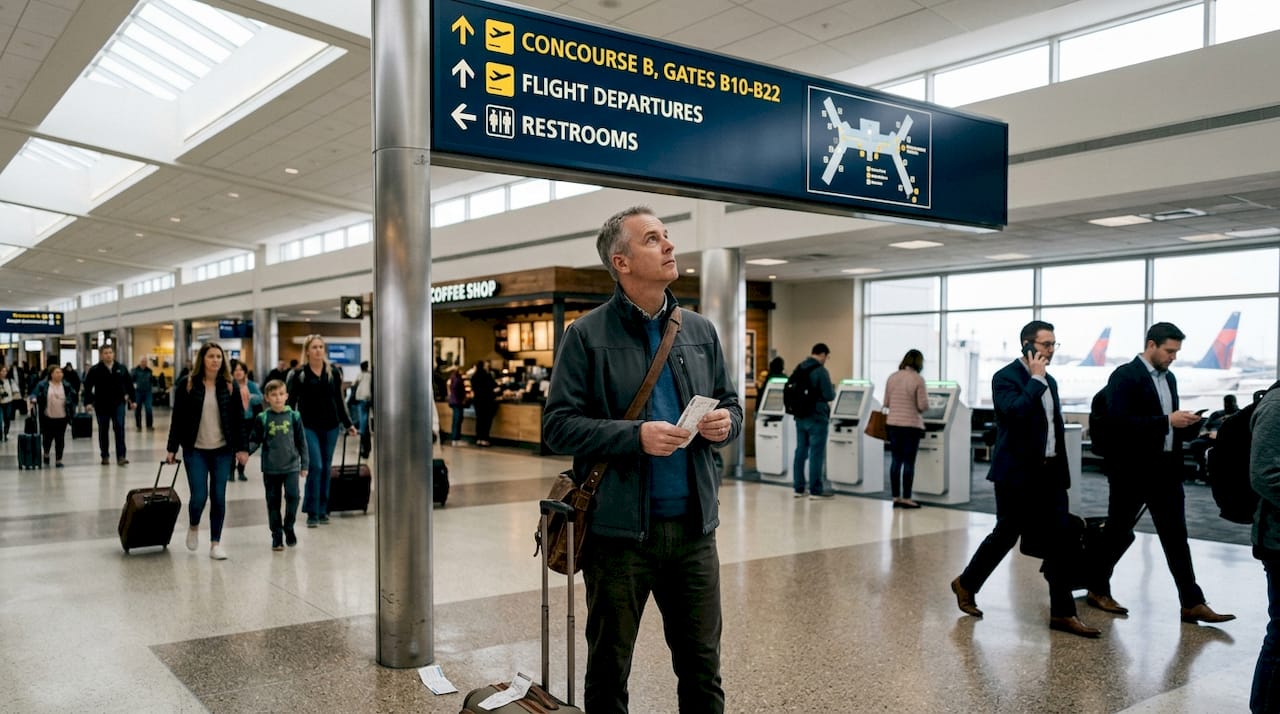
The airport used VR simulations and eye-tracking technology to test different sign configurations before installation. This validation approach confirmed that 3D terminal maps outperformed traditional 2D layouts for search tasks, allowing designers to optimize placement based on actual user behavior rather than assumptions.
| Metric | Before Optimization | After Implementation | Improvement |
|---|---|---|---|
| Navigation Time | Average 8.2 minutes | Average 5.3 minutes | 35% reduction |
| Directional Inquiries | 420 per day | 168 per day | 60% reduction |
| User Confidence Rating | 6.2/10 | 8.7/10 | 40% increase |
Similar results appear across diverse environments:
- Healthcare facilities see reduced patient anxiety and improved appointment punctuality
- Shopping centers experience longer dwell times and increased sales per visit
- Convention centers report smoother event flow and fewer staff interventions
- Corporate campuses achieve faster onboarding and better space utilization
Technology plays a growing role in validation and optimization. Eye-tracking reveals which signs capture attention and which get overlooked. Heat mapping shows actual traffic patterns versus intended routes. Mobile analytics track digital wayfinding usage and identify pain points.
For your business, faster navigation means happier customers who associate your brand with ease and professionalism. When visitors confidently find meeting rooms, restrooms, or product displays without frustration, they form positive associations that drive loyalty and referrals.
Implementing interior signs and directional door signs based on proven frameworks ensures your investment delivers similar measurable improvements.
Types of wayfinding systems: Static, digital, and hybrid
Choosing between static, digital, and hybrid wayfinding systems depends on your space characteristics, audience needs, and operational priorities. Each approach offers distinct advantages for different business contexts.
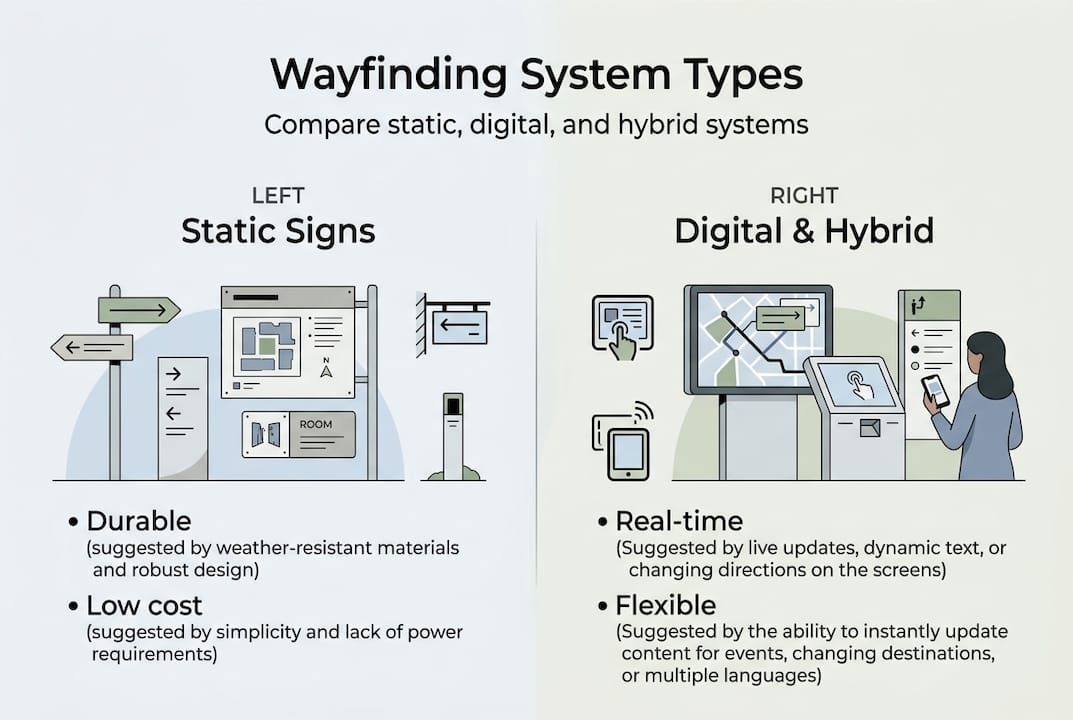
Static wayfinding uses permanent physical signs, maps, and environmental graphics. These systems provide reliable, always-on guidance without technical dependencies. They excel in stable environments where routes and destinations rarely change.
Static system advantages:
- Lower upfront and maintenance costs
- No power requirements or technical support needed
- Consistent branding and visual identity
- Proven durability in harsh environments
- Instant visibility without user interaction
Static system limitations:
- Cannot adapt to temporary changes or events
- Limited ability to provide personalized routing
- No usage analytics or performance data
- Updates require physical replacement
Digital wayfinding employs interactive kiosks, mobile apps, and dynamic displays. Digital systems offer analytics and multi-language flexibility) but require higher investment and ongoing technical maintenance.
Digital system advantages:
- Real-time updates for closures or events
- Multi-language support for diverse audiences
- Personalized routing based on user needs
- Usage analytics inform optimization
- Integration with scheduling and booking systems
Digital system limitations:
- Higher initial investment and maintenance costs
- Requires reliable power and network infrastructure
- Technical failures create navigation gaps
- Learning curve for some user demographics
Hybrid systems combine static foundations with digital enhancements. Primary wayfinding uses permanent signs while digital touchpoints provide supplementary information, updates, or personalization.
“The best wayfinding system is the one users don’t notice. When navigation feels intuitive, people focus on their destination rather than finding their way.”
Key selection factors include:
- Space scale and complexity determine system sophistication needs
- Audience demographics influence interface preferences and accessibility requirements
- Change frequency affects whether static or dynamic systems make sense
- Budget constraints guide technology investment levels
- Brand control considerations favor static for consistent visual identity
Pro Tip: Start with excellent spatial design and clear sight lines before adding signs. The best wayfinding makes navigation obvious through architecture and layout, using signage only to confirm choices rather than compensate for confusing spaces.
For businesses requiring accessibility compliance, ADA signs integrate seamlessly into any system type while meeting regulatory standards.
Design principles for effective wayfinding
Strong wayfinding design balances visual clarity, brand consistency, and inclusive accessibility. These principles ensure your navigation system works for all users while reinforcing your professional image.
Information hierarchy organizes content by importance. Primary information like destinations appears largest and most prominent. Secondary details like distances or hours use smaller text. Tertiary information provides context without cluttering decision-making.
Visual consistency builds user confidence through predictable patterns:
- Use the same color for similar sign types throughout your space
- Maintain consistent typography, sizing, and placement standards
- Apply uniform symbols and pictograms across all touchpoints
- Establish clear distinction between directional, identification, and informational signs
Color and contrast enhance legibility while supporting brand identity. High contrast between text and background ensures readability from distance. Color coding creates intuitive zones without requiring users to read every sign. However, never rely solely on color since some users have color vision deficiencies.
Inclusive design features expand accessibility:
- ADA-compliant tactile elements including Braille and raised lettering at standard heights
- Multi-language support for diverse audiences in international or tourist-heavy locations
- Universal symbols that communicate across language barriers
- Appropriate lighting ensuring visibility in all conditions
- Clear sight lines accommodating wheelchair users and varying heights
Pro Tip: Test your wayfinding layout with actual users before final installation. Walk-throughs reveal gaps in logic, confusing placement, or missing decision points that designers overlook. Even simple prototype testing with cardboard signs catches problems early.
Poor wayfinding erodes brand trust as customers associate navigation frustration with your business. Regular system maintenance preserves effectiveness. Update signs when spaces change, replace damaged elements promptly, and refresh outdated information immediately.
Applying these principles to interior signage design and architectural signs creates cohesive systems that guide users effortlessly while strengthening brand perception.
Integrating wayfinding into your business or event space
Successful wayfinding implementation follows structured processes that align system design with user needs and business goals. Structured processes like discovery, definition, development, delivery) with user research underpin effective wayfinding.
Space audit and decision mapping:
- Walk your space from multiple entry points, noting every decision point where users choose direction
- Identify destinations users seek most frequently
- Map actual traffic patterns versus intended routes
- Document existing signage gaps, conflicts, or redundancies
- Assess lighting conditions, sight line obstructions, and architectural constraints
Sign hierarchy development:
- Categorize signs by function: directional, identification, informational, regulatory
- Establish size standards based on viewing distance and importance
- Define placement rules ensuring visibility at decision points
- Create content guidelines maintaining consistent messaging
- Specify materials and finishes appropriate for each location
User testing and validation:
- Conduct walk-throughs with representative users unfamiliar with your space
- Use VR simulations to test configurations before physical installation
- Gather feedback on clarity, placement, and information completeness
- Track time-to-destination and wrong turn frequency
- Iterate designs based on observed behavior rather than reported preferences
Deployment checklist:
- Fabricate signs according to approved specifications and brand standards
- Schedule installation during low-traffic periods to minimize disruption
- Verify placement matches approved plans and maintains sight lines
- Train staff on system logic so they can assist users effectively
- Monitor initial performance and address issues immediately
- Establish maintenance schedule for cleaning, repairs, and updates
Common pitfalls to avoid:
- Overloading signs with too much information creates cognitive burden
- Inconsistent terminology confuses users searching for destinations
- Poor placement at decision points forces backtracking
- Ignoring user feedback after launch misses optimization opportunities
- Neglecting maintenance allows systems to degrade and lose effectiveness
Regular reviews ensure continued relevance. Audit your wayfinding system annually, updating for space changes, new destinations, or shifting traffic patterns. Solicit ongoing user feedback through surveys or observation to identify emerging pain points.
For specialized applications, directional sign installation and event directional signage require additional considerations for temporary setups, outdoor durability, and rapid deployment.
Bring your wayfinding vision to life with custom signage
Transforming wayfinding principles into reality requires expertise in design, fabrication, and installation. Professional custom signage providers streamline the entire process from initial consultation through final implementation, ensuring your navigation system delivers the measurable improvements proven by research.
Custom signage tailors every element to your specific space, brand identity, and audience needs. Rather than generic solutions, you get signs designed for your exact decision points, viewing distances, and environmental conditions. This precision maximizes effectiveness while maintaining visual consistency across all touchpoints.
Working with experienced signage professionals brings multiple advantages. They conduct thorough site assessments identifying optimal placement. Their design teams create cohesive systems balancing functionality with brand aesthetics. Fabrication expertise ensures durability and compliance with accessibility standards. Professional installation guarantees proper mounting and sight lines.
Whether you need comprehensive wayfinding for a complex facility or targeted directional signs for specific areas, custom signs provide the flexibility to match your requirements and budget. Options like face change signs allow easy updates for changing tenants or seasonal messaging. Exterior lightbox signs ensure visibility in all lighting conditions while reinforcing brand presence.
The investment in professional wayfinding pays dividends through improved customer satisfaction, reduced staff burden, and stronger brand perception. When visitors navigate your space confidently, they associate that positive experience with your business, driving loyalty and referrals.
Frequently asked questions
What is the core difference between wayfinding and wayshowing?
Wayfinding emphasizes the user’s active navigation process), while wayshowing focuses on proactively guiding people through predetermined routes. Wayfinding supports decision-making; wayshowing leads directly.
How do digital and static wayfinding systems compare for events?
Digital systems provide real-time updates and analytics) but require technical support and higher costs. Static systems offer reliability and lower maintenance but cannot adapt quickly to schedule changes.
Why is wayfinding maintenance important for businesses?
Ongoing maintenance prevents confusion and preserves brand trust. Poor wayfinding erodes credibility as customers associate navigation frustration with your business, making regular updates essential.
What spaces benefit most from strategic wayfinding?
Airports, hospitals, shopping centers, event venues, and corporate campuses see greatest impact. Any environment where users must orient themselves and decide routes benefits from structured wayfinding systems.
How can I test my wayfinding design before installing final signage?
VR simulations and eye-tracking validate effectiveness before installation. Pilot testing with actual users walking your space reveals placement issues and information gaps early.