
{
“@type”: “Article”,
“image”: {
“url”: “https://csuxjmfbwmkxiegfpljm.supabase.co/storage/v1/object/public/blog-images/organization-6408/1776472788987_Manager-reviewing-custom-signage-workflow-materials.jpeg”,
“@type”: “ImageObject”,
“caption”: “Manager reviewing custom signage workflow materials”
},
“author”: {
“url”: “https://customsignstoday.us”,
“name”: “Customsignstoday”,
“@type”: “Organization”
},
“@context”: “https://schema.org”,
“headline”: “Streamline Your Custom Signage Request: 50% Faster Results”,
“publisher”: {
“url”: “https://customsignstoday.us”,
“name”: “Customsignstoday”,
“@type”: “Organization”
},
“inLanguage”: “en-US”,
“articleBody”: “Learn how to streamline your custom signage request workflow with step-by-step execution, automation tips, and expert strategies that cut turnaround time by up to 50%.”,
“description”: “Learn how to streamline your custom signage request workflow with step-by-step execution, automation tips, and expert strategies that cut turnaround time by up to 50%.”,
“datePublished”: “2026-04-18T00:40:41.903Z”
}
TL;DR:
- Structured workflows can reduce custom signage turnaround times by up to 50 percent.
- Clear stakeholder alignment and early permit planning prevent project delays.
- Automation tools save time and reduce errors for high-volume, multi-site signage projects.
Custom signage requests have a way of spiraling into chaos right when you need them most. Missed approvals, permit delays that stretch two to six weeks, and unclear responsibilities between marketing, facilities, and vendors can turn a straightforward banner order into a month-long headache. A structured workflow can cut turnaround times by up to 50% and spare your team the frustration of rework and last-minute scrambles. This guide walks you through everything: what you need upfront, how to execute each stage, when to automate, and how to handle the curveballs that derail even well-organized projects.
Table of Contents
- What you need to launch a custom signage request workflow
- Step-by-step: Executing the custom signage request workflow
- Automation tools vs manual workflows: Which is right for you?
- Troubleshooting, edge cases, and expert strategies
- What most businesses get wrong about signage request workflows
- Connect with experts for your next custom signage project
- Frequently asked questions
Key Takeaways
| Point | Details |
|---|---|
| Preparation reduces errors | Gathering the right team, documents, and approvals up front prevents costly delays during signage projects. |
| Automation speeds results | Using digital tools can cut request processing time in half and seriously reduce staff workload. |
| Permits are a key hurdle | Plan for 2-6 week permit cycles as the most likely source of workflow delays. |
| Communication is critical | Strong workflow outcomes depend more on clear stakeholder communication than on the latest technology. |
What you need to launch a custom signage request workflow
Before you submit a single request, get clear on why you need the sign. Is it for brand visibility, regulatory compliance, event promotion, or wayfinding? Your answer shapes every decision downstream, from materials to permit requirements. Skipping this step is one of the most common reasons projects stall after design is already underway.
Next, identify every stakeholder who has a say in the outcome. That typically includes your marketing manager, facilities or property manager, the landlord if you’re in a leased space, and sometimes a legal or compliance officer. Getting these people aligned early prevents the dreaded “wait, nobody told me” moment during final approvals.
You’ll also need a core set of documents before anything moves forward:
- Brand guidelines (logos, color codes, approved fonts)
- Site plans or measurements for the installation location
- Local sign codes and permit requirements for your municipality
- Vendor quote templates and approved supplier contacts
- Approval routing list with names and sign-off deadlines
Signage workflow steps typically follow a structured process involving request intake, site assessment, design, approvals, fabrication, installation, and post-install review. Here’s a quick-reference table to keep your team organized:
| Stage | Tools needed | Documents required | Approvals needed |
|---|---|---|---|
| Request intake | Project management tool | Brief, brand guidelines | Marketing lead |
| Site assessment | Measuring tape, photos | Site plan | Facilities manager |
| Design/proofing | Design software | Brand guidelines | Client, marketing |
| Permit/approvals | Permit portal | Local code docs | Municipality, landlord |
| Fabrication | Vendor portal | Approved proof | Production manager |
| Installation | Install crew schedule | Work order | Facilities, landlord |
| Post-install review | Camera, checklist | Punch list | Project owner |
Pro Tip: Build a shared checklist in a tool like Asana, Trello, or even a Google Sheet from day one. Assign owners and due dates to every task. Teams that use a shared template from the start cut back-and-forth emails by more than half.
Step-by-step: Executing the custom signage request workflow
With your prerequisites locked in, here’s how to move through each stage without losing momentum.
- Intake and discovery. Collect the project brief, goals, dimensions, location details, and deadline. The more specific, the better. Vague briefs create vague results.
- Site assessment. Have facilities or an on-site contact measure the space, photograph the area, and note any obstructions or surface conditions. This prevents costly fabrication errors.
- Design and proofing. Your designer works from the approved brief and brand guidelines. Require at least one round of client review before moving forward. For property signage design, accurate dimensions matter as much as aesthetics.
- Approvals. Route the approved proof to all stakeholders simultaneously, not sequentially, to save days. Flag permit applications here too.
- Fabrication. Once all approvals are signed off, the vendor begins production. Confirm material specs and delivery timelines in writing.
- Installation. Coordinate with facilities and any required contractors. Confirm the site is ready before the crew arrives to avoid wasted trips.
- Post-install review. Walk the site, photograph the finished sign, and compare against the original proof. Document any punch-list items immediately.
Critical delay alert: Permit approvals are the single most unpredictable stage. Budget 2 to 6 weeks for permit processing in most municipalities, and submit applications as early as possible, ideally before design is even finalized.
The signage step-by-step process works best when roles are crystal clear. Marketing owns the brief and approvals. Facilities owns the site assessment and installation coordination. The vendor owns fabrication timelines.

Pro Tip: If you’re managing a multi-site rollout, batch your permit applications together. Many municipalities allow simultaneous submissions, and a single coordinated push saves weeks compared to filing one location at a time.
Automation tools vs manual workflows: Which is right for you?
Once you’ve run a few signage projects manually, you’ll start to feel where the friction lives. Repetitive quoting, chasing approvals via email, and manually tracking fabrication status are prime candidates for automation.
Digital workflow platforms like ZenSmart automation and PrintPLANR streamline quoting, batching, and scheduling across your entire sign program. These tools connect intake forms directly to production queues, send automated approval reminders, and generate real-time status dashboards. The result: fewer dropped balls and faster handoffs.
The numbers back this up. Automation tools can reduce processing time by 20 to 50% and cut labor costs significantly, according to documented case studies. That’s not a marginal improvement. For a business running 20 or more sign projects per year, that translates to real budget savings.
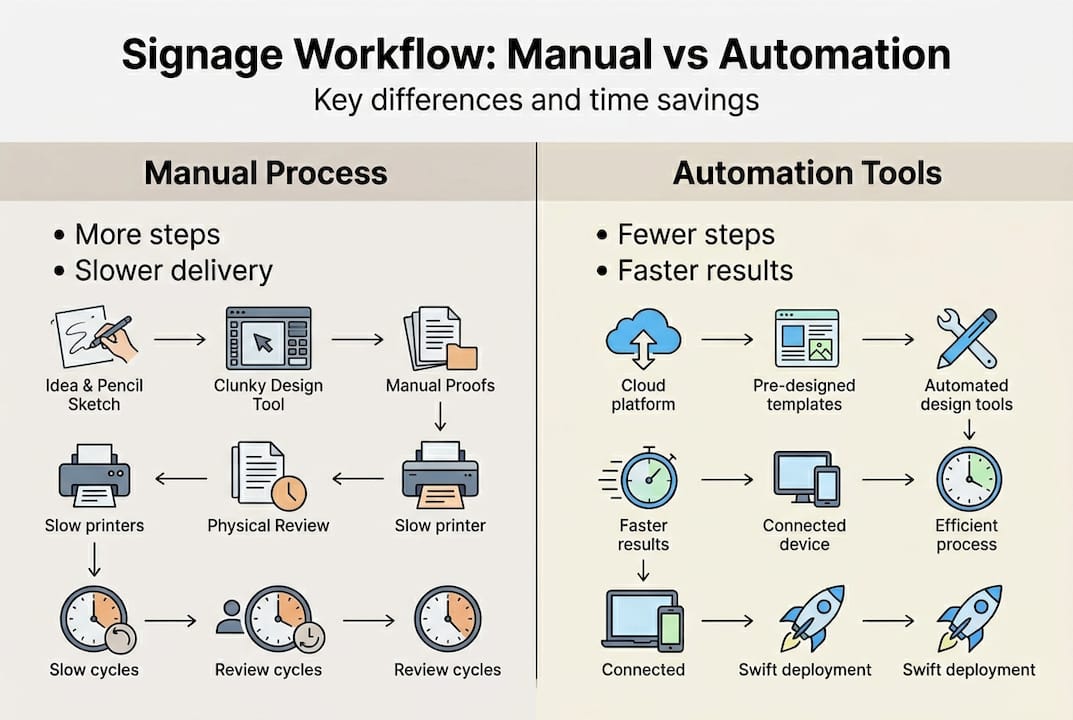
Here’s a side-by-side comparison to help you decide:
| Factor | Manual workflow | Automated workflow |
|---|---|---|
| Setup time | Low | Medium to high |
| Cost | Low upfront | Software subscription |
| Approval tracking | Email chains | Dashboard with alerts |
| Error risk | Higher | Lower |
| Best for | Low volume, highly custom | High volume, multi-site |
| Time savings | Baseline | 20 to 50% faster |
Automation makes the most sense when you recognize these signals:
- You’re managing five or more active sign projects at once
- Your team is spread across multiple locations or departments
- You’re hitting tight campaign deadlines repeatedly
- Approval bottlenecks are causing missed launch dates
That said, manual control still wins for highly custom one-off projects, compliance-sensitive signage, or situations where a hands-on vendor relationship is essential. Use streamline workflow tips to decide which hybrid approach fits your operation.
Troubleshooting, edge cases, and expert strategies
Even well-planned workflows hit walls. Knowing the most common failure points in advance lets you build around them rather than react to them.
The most frequent issues that derail custom signage requests include:
- Permit delays caused by incomplete applications or non-compliant designs
- Endless review cycles when stakeholder feedback isn’t consolidated
- Site logistics surprises like unexpected surface materials or access restrictions
- Last-minute design changes that reset the fabrication clock
- Vendor capacity gaps during peak seasons
Permit delays, multi-department approvals, and late-stage changes are the most frequent issues reported by sign professionals. The fix isn’t reactive. It’s proactive.
Pro Tip: Pull your local municipality’s sign code before design begins, not after. Many permit rejections happen because the design doesn’t meet setback, height, or illumination rules that could have been addressed at the brief stage.
For large organizations with multi-department approval chains, create a single consolidated feedback document rather than routing the proof to each reviewer separately. Assign one internal champion to gather all comments and deliver a unified response to the vendor. This alone can cut review cycles from three rounds to one.
Field reality: Most projects that miss their launch date were delayed not by fabrication, but by permits or internal approvals that nobody tracked. Build these into your timeline from day one.
For multi-site projects, centralize your brand standards and permit templates, but empower local contacts to execute within those guardrails. Trying to manage every location from headquarters creates bottlenecks. Reviewing installation bottlenecks and referencing a solid sign compliance guide before you start will save you from the most predictable headaches.
What most businesses get wrong about signage request workflows
Here’s an uncomfortable truth we’ve seen play out repeatedly: most signage workflow failures are communication problems, not technology problems. Teams invest in project management software, hire new vendors, and redesign their approval processes, then wonder why projects still run late.
The real issue is almost always upstream. Stakeholders weren’t aligned on goals before design started. Code requirements weren’t checked until the permit was rejected. The landlord’s approval was treated as a formality and came back with major objections.
Putting compliance and approvals first, not last, is the single biggest shift that separates teams that consistently hit their deadlines from those that don’t. A well-executed signage campaign planning process treats permit research and stakeholder alignment as the foundation, not the finish line.
The hidden cost of skipping this isn’t just time. It’s the downstream rework, the reprinting fees, and the campaign launches that slip by two weeks because one approval wasn’t secured early enough. Better workflows produce better campaign outcomes, not just cleaner process charts.
Connect with experts for your next custom signage project
Applying a structured workflow is far easier when you’re working with a signage partner who already knows the terrain. At Custom Signs Today, we’ve built our process around the exact stages covered in this guide, so your project moves from brief to installation without unnecessary back-and-forth.
Whether you need to explore custom sign services for a full brand refresh, update your storefront with face change signs, or simply want to see all sign options before deciding, our specialists are ready to help you move fast and get it right. Request a free quote today and put your new workflow knowledge to work.
Frequently asked questions
What are the standard steps in a custom signage request workflow?
Typical steps are: intake, site assessment, design, proofing, multi-level approvals, fabrication, installation, and post-install review. Most providers follow 7 to 9 common steps across these core stages.
How long does it take to process a custom signage request?
For a straightforward sign, budget 2 to 6 weeks for permit approvals alone, while automation cuts turnaround time by up to 50% for the overall workflow.
Is automating the workflow worth it for small businesses?
If you handle frequent or multi-site projects, automation benchmarks show 20 to 50% time and labor savings, which adds up quickly even for smaller operations.
What is the biggest bottleneck in custom signage requests?
Permitting is typically the main cause of delays. In municipalities with complex codes, permits can take 2 to 6 weeks and are the leading reason projects miss their launch dates.